
Activating and licensing your new software tool is essential for its use and can be accomplished easily, even if you're a small business owner with limited technical experience. The activation process typically requires just a few steps and involves entering a product key and connecting to the internet.
What you need before starting the activation process
Before you begin the activation process, ensure you have the following items:
- Your product key, which is typically found in your purchase confirmation email or on the packaging.
- A reliable internet connection, as many software tools require online verification.
- An account with the software provider, if applicable, as some tools require you to log in after activation.
- The correct version of the software that matches your license, as attempting to activate the wrong version may lead to errors.
Step-by-step guide to activating your software
Activating your software is a systematic process. Follow these steps:
- Launch the software tool you just installed.
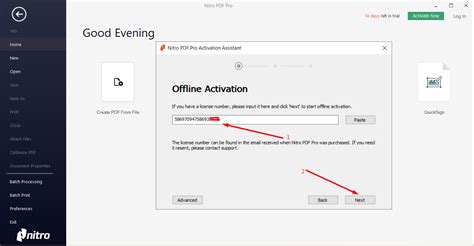
- When prompted, select the option to activate your software.
- Enter your product key into the designated field. ``
text Product Key: XXXXX-XXXXX-XXXXX-XXXXX-XXXXX`` - Click the 'Activate' button.
- If required, log in with your account credentials.
- Wait for the software to confirm activation. You should see a confirmation message once it’s successful.
Troubleshooting common activation issues
Sometimes, issues arise during activation. Here’s how to handle common problems:
- Invalid Product Key: Double-check that you entered the key correctly, ensuring no typos or extra spaces. If it still doesn’t work, contact the vendor for assistance.
- Internet Connection Issues: Ensure your device is connected to the internet. If the software can't connect, try troubleshooting your network.
- Account Login Problems: If you can’t log in, reset your password or check if your account is active and correctly set up.
How to check if your software is properly licensed
After activation, it’s important to verify that your software is licensed correctly. To do this:
- Open the software tool.
- Navigate to the 'Help' or 'About' section, usually found in the menu.
- Look for a line that states your license status or activation status. It should indicate that you are using a licensed version.
What to do if activation fails
If activation fails, don’t panic. Follow these steps:
- Review any error messages for clues about the issue.
- Retry the activation process, ensuring all details are entered correctly.
- If it still doesn’t work, check the software provider’s support page for troubleshooting advice.
- As a last resort, contact customer support for assistance. They can guide you through the process or provide a replacement key if necessary.
Conclusion
Once you successfully activate your software, you can start using it to enhance your business operations. If you encounter difficulties, reach out to support for help. Staying proactive will ensure you can maximize the benefits of your new tool without delays.
Frequently Asked Questions
What should I do if I lose my product key?
Contact the software provider's customer support for assistance. They may be able to recover your key based on your purchase details.
Can I activate my software on multiple devices?
This depends on the software's licensing agreement. Some licenses allow installation on multiple devices, while others are limited to a single device.
Is an internet connection required for activation?
Most software tools require an internet connection for activation. However, some may allow offline activation with specific steps.
What if I change my computer? Will I need a new license?
In many cases, you can transfer your license to a new computer, but you may need to deactivate it on the old one first. Check your software's licensing terms.