
As a project manager, benchmarking software is essential for improving your team's productivity through data-driven insights. It allows you to compare your organization's performance metrics against industry standards and best practices. This guide will help you effectively use benchmarking software by outlining key features, setup steps, result analysis, and common pitfalls to avoid.
What is benchmarking software and why use it?
Benchmarking software measures and compares an organization's performance against established standards, industry averages, or competitors. It helps identify performance gaps, track progress over time, and facilitate informed decisions aimed at enhancing efficiency. For example, if your team consistently misses project delivery timelines compared to industry benchmarks, the software can highlight specific areas for improvement, enabling targeted action.
Essential features of effective benchmarking software
When selecting benchmarking software, consider the following features to ensure it meets your needs:
- Data Integration: The software should easily connect with existing tools and data sources, such as project management software, time tracking tools, and financial systems.
- Customizable Metrics: Look for software that allows you to define and customize metrics relevant to your specific goals and industry.
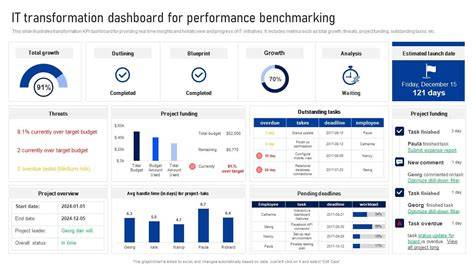
- Reporting Capabilities: Effective software should offer comprehensive reporting features that visualize data trends and provide actionable insights through dashboards and reports.
- User-Friendly Interface: A simple, intuitive interface will facilitate adoption by your team, minimizing the need for extensive training.
Prerequisites for using benchmarking software
Before you start using benchmarking software, ensure you have the following:
- Access to benchmarking software that fits your needs.
- Relevant performance data from your organization.
- User accounts set up for team members who will use the software.
- Basic understanding of the metrics that matter for your organization.
Step-by-step guide to setting up benchmarking software
To effectively use benchmarking software, follow these steps:
- Choose the Right Software: Research and select benchmarking software that fits your organization’s needs based on the features discussed.
- Install the Software: Download and install the benchmarking software, following any setup instructions provided by the vendor.
- Configure Initial Settings: Open the software and configure initial settings, including user accounts and data sources.
- Import Data: Load your current performance data into the software. This may involve uploading files or connecting to existing databases.
- Set Benchmarking Metrics: Define the metrics you want to benchmark against. Ensure these align with your organizational goals.
- Run an Initial Benchmark: Execute the initial benchmark to establish a baseline for your performance metrics.
- Review Configuration: Check settings to ensure all data is correctly imported and metrics are accurately defined.
How to analyze and interpret your benchmarking results
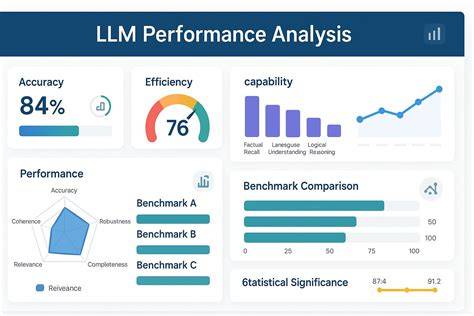
Once you've run your benchmarks, analyzing the results is crucial. Start by comparing your performance metrics against the established benchmarks. Identify areas where your performance exceeds expectations and those where it falls short. For example, if your team completes 80% of projects on time while the benchmark is 90%, this indicates a need for improvement in project management processes.
Next, look for trends over time. If performance is improving or declining, consider what changes may have influenced these trends. Use visual reports to communicate findings to your team, facilitating discussions on how to improve performance in specific areas.
Common pitfalls to avoid when using benchmarking software
While benchmarking can provide valuable insights, there are common mistakes to be aware of:
- Ignoring Context: Benchmarking data should be understood within the context of your organization. Simply comparing numbers without understanding the underlying factors can lead to misguided conclusions.
- Focusing on Wrong Metrics: Ensure the metrics you choose to benchmark are relevant to your objectives. Tracking irrelevant metrics may waste time and resources.
- Neglecting Data Quality: Poor data quality can skew results. Always verify the accuracy of the data you input into the software.
- Overemphasizing Competitors: While competitor benchmarks are useful, they should not be the sole focus. Internal benchmarks are equally important for tracking your progress over time.
Conclusion
To leverage benchmarking software effectively, start by selecting the right tool and setting it up properly. Regularly analyze your results to gain insights into your team's performance and make informed decisions for improvement. Stay vigilant for common pitfalls to ensure accurate data interpretation and meaningful change.
Frequently Asked Questions
What types of metrics can I benchmark?
You can benchmark various metrics, including project completion rates, time management efficiency, budget adherence, and team productivity.
How often should I run benchmarks?
The frequency depends on your project cycles and goals, but running benchmarks quarterly or biannually is common for effective tracking.
Can benchmarking software integrate with other tools?
Most benchmarking software can integrate with project management tools, CRM systems, and financial software to streamline data collection.
What should I do if my benchmarking results are poor?
Analyze the data to identify specific weaknesses, engage your team in discussing potential improvements, and set targeted goals for enhancement.