If you're buying a new PC, it's essential to ensure that it meets the minimum requirements for Windows 11. Microsoft has set specific hardware standards that your device must meet to run the operating system smoothly and securely.
What are the official minimum requirements for Windows 11?
To run Windows 11, your PC must meet the following minimum requirements set by Microsoft:
- Processor: 1 GHz or faster with at least two cores on a compatible 64-bit processor or System on a Chip (SoC).
- RAM: 4 GB or more.
- Storage: 64 GB or larger storage device.
- System firmware: UEFI, Secure Boot capable.
- TPM: Trusted Platform Module (TPM) version 2.0.
- Graphics card: DirectX 12 compatible graphics / WDDM 2.x.
- Display: >9” with HD Resolution (720p).
These requirements ensure that Windows 11 runs efficiently and securely on your device.
Why do these requirements matter for my PC?
Each requirement is crucial for your PC's performance with Windows 11.
- Processor: A compatible CPU is necessary for handling basic tasks and running applications smoothly. An older processor may lead to slow performance, especially when multitasking.
- RAM: With 4 GB as the minimum, more RAM allows for better multitasking. If you plan to run several programs simultaneously, consider opting for 8 GB or more for a smoother experience.
- Storage: Windows 11 needs at least 64 GB of storage for installation and updates. Having less storage could prevent you from installing updates or new applications.
- TPM and Secure Boot: These features enhance your device's security, protecting it from various threats. Without them, your system could be more vulnerable to malware.
Overall, meeting these requirements helps ensure you can use Windows 11 effectively.
How can I check if my PC meets these requirements?
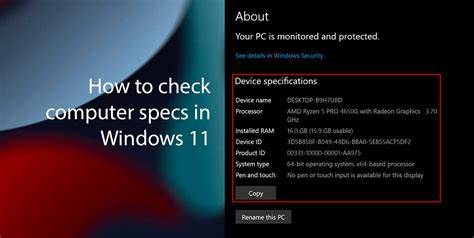
You can easily check your PC’s specifications to see if it meets the minimum requirements for Windows 11 by following these steps:
- Open Settings: Click the Start menu and select the gear icon to open Settings.
- Go to System: In the Settings window, click on 'System'.
- About: Scroll down and select 'About' from the left sidebar.
- Check Specifications: Here, you'll see the Device specifications section, which includes information about your processor, RAM, and system type (32-bit or 64-bit).
- Check TPM Version: Press
Windows + Rto open the Run dialog, typetpm.msc, and hit Enter. This will open the TPM Management window, showing you the version of TPM installed. - Storage Information: Go back to the Settings, then select 'System', followed by 'Storage' to see how much space is available on your device.
By following these steps, you can determine whether your current setup is compatible with Windows 11.
What should I do if my PC doesn't meet the requirements?
If your PC does not meet the minimum requirements for Windows 11, consider these options:
- Upgrade Components: If your PC is relatively new, you might upgrade components like the RAM or storage. For example, increasing your RAM from 4 GB to 8 GB can significantly enhance performance.
- Check for Compatibility: If your CPU is the only component lacking, verify if your motherboard can support a compatible, newer processor.
- Purchase a New Device: If upgrades are not feasible, consider buying a new PC that meets or exceeds the Windows 11 requirements. This may be the best option for a long-term investment.
- Stick with Windows 10: If neither option is suitable and you’re not in a hurry to upgrade, remember that Windows 10 will continue to receive support until October 14, 2025, giving you time to plan your next move.
Are there any common misconceptions about Windows 11 requirements?
Many people have misconceptions about the requirements for Windows 11. Here are a few common ones:
- Misconception: You can run Windows 11 on older hardware without any issues. - Reality: While some older hardware might technically install Windows 11, it may not perform well or receive updates, leading to security vulnerabilities.
- Misconception: RAM is not that important, so 4 GB is enough for everyone. - Reality: While 4 GB is the minimum, many users will find it insufficient for multitasking or using demanding applications, which can lead to a frustrating experience.
- Misconception: If your PC can run Windows 10, it can run Windows 11. - Reality: Not all hardware that supports Windows 10 will meet the new requirements for Windows 11, particularly regarding TPM and Secure Boot capabilities.
Conclusion
Understanding these minimum requirements can help you choose a PC that will run Windows 11 effectively. If you're in the market for a new device, make sure to check these specifications to avoid compatibility issues. This way, you’ll be ready to enjoy all the features Windows 11 has to offer without any complications.