A Windows 11 digital license is a method to activate your operating system without needing a traditional product key. If you've upgraded from Windows 10, your digital license may have transferred automatically, but understanding how it works can help clarify any confusion you might have.
What is a Windows 11 digital license?
A Windows 11 digital license, previously known as a digital entitlement, allows you to activate your operating system without a physical product key. Instead, the license is linked to your Microsoft account or the hardware of your device. For example, if you upgrade from Windows 10 to Windows 11 on the same machine, your existing digital license typically transfers automatically, enabling you to use Windows 11 without entering a new product key.
How it Works
When you first activate Windows, the system checks your hardware configuration. If you upgrade to Windows 11, this configuration is recorded, and your license is tied to it. If you make significant hardware changes, however, you may need to reactivate your license.
How do I check if I have a digital license?
To check whether your Windows 11 is activated with a digital license, follow these steps:
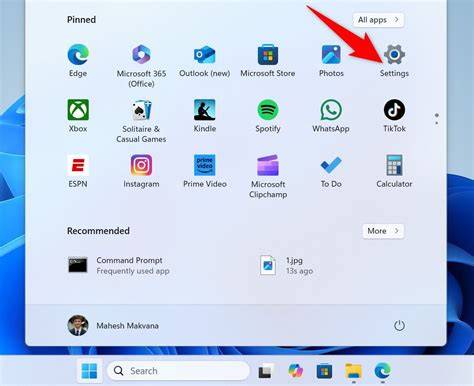
- Click on the Start button and select Settings.
- In the Settings window, click on System.
- Scroll down and select About.
- Look for the Activation section. Here, you will see if your copy of Windows is activated with a digital license.
If it states "Windows is activated with a digital license," you have a digital license.
What are the benefits of having a digital license?
Having a digital license offers several advantages:
- Easy Reinstallation: If you need to reinstall Windows 11, your device will activate automatically as long as you're using the same hardware. You won't have to search for or enter a product key.
- Updates: Digital licenses ensure that your operating system receives regular updates without additional activation prompts.
- Link to Microsoft Account: If your digital license is linked to your Microsoft account, you can easily manage your licenses across devices, making transitions between systems simpler.
Can I transfer my digital license to another device?
You can transfer your digital license to another device under certain conditions. If your license is linked to your Microsoft account, you can deactivate it on the current device and activate it on a new one. However, if the license was purchased as a retail version, it can usually be transferred. If it came pre-installed on a device (OEM license), it generally cannot be transferred. To transfer a digital license:
- Deactivate the license on the old device by going to Settings > Update & Security > Activation and selecting Troubleshoot.
- Install Windows 11 on the new device.
- Log in with the same Microsoft account and activate.
What to do if I can't activate Windows 11?
If you're having trouble activating Windows 11, follow these steps:
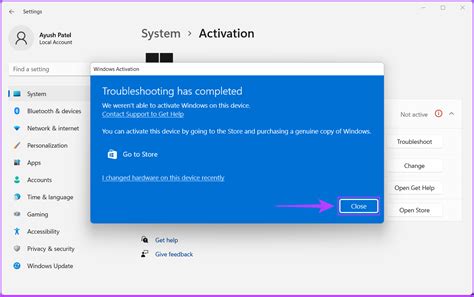
- Go to Settings > Update & Security > Activation.
- Click on Troubleshoot. Windows will attempt to find and fix any activation issues.
- Ensure that you are connected to the internet.
- If prompted to enter a product key, you can use the one provided with your previous version of Windows, if applicable.
- If the issue persists, consider contacting Microsoft support for assistance.
Conclusion
Understanding your Windows 11 digital license can make your experience with the operating system much smoother. If you encounter any issues, the troubleshooting steps and support options are available to help you resolve them quickly.
Frequently Asked Questions
What if I upgrade my hardware? Will my digital license still work?
If you upgrade significant hardware, like the motherboard, Windows may not recognize your device as the same one. You might need to reactivate Windows using your Microsoft account or contact support.
Can I use my digital license on a virtual machine?
Typically, a digital license is tied to the physical hardware of your device. Using it on a virtual machine may require a separate license.
What types of licenses are available for Windows 11?
There are several types, including OEM licenses (pre-installed on devices), retail licenses (purchased separately), and volume licenses for businesses.