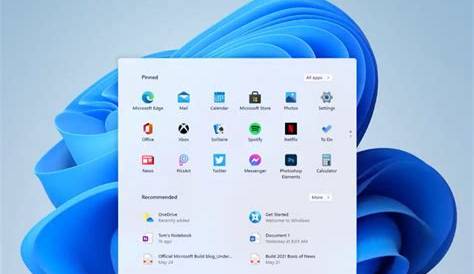
The Windows 11 Insider Preview program allows users to test upcoming features and updates before their official release. By participating, you can explore new functionalities and provide feedback to Microsoft, which helps shape the final product.
What is Windows 11 Insider Preview?
Windows 11 Insider Preview serves as a testing platform for users eager to experience new features and improvements before they are available to the general public. It’s aimed at tech enthusiasts and developers who assist Microsoft in identifying issues and gathering feedback. For example, if you want to try a new interface or feature, the Insider Preview grants you early access, enabling you to explore and experiment with these updates.
How to join the Windows 11 Insider Program
Joining the Windows 11 Insider Program involves several steps to ensure your system is ready. Here’s how to get started:
- Make sure your device meets the system requirements for Windows 11.
- Open Settings.
- Click on ‘Windows Update.’
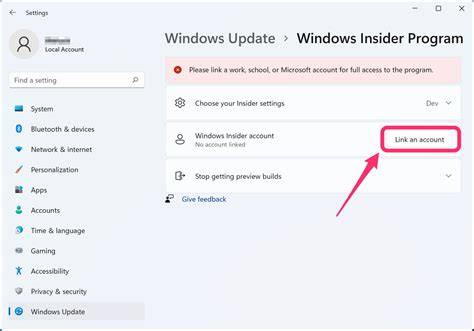
- Select ‘Windows Insider Program.’
- Click on ‘Get started’ and link your Microsoft account.
- Choose your Insider settings (Dev Channel, Beta Channel, or Release Preview Channel).
- Restart your device to apply the changes.
Participating in the Insider Program may require you to deal with unstable builds, so ensure you back up your data.
Benefits of using Windows 11 Insider Preview
Participating in the Windows 11 Insider Preview program offers several advantages:
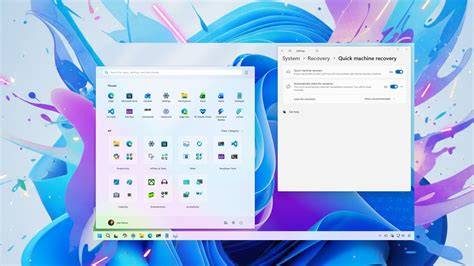
- Early Access to Features: You can try out the latest features before anyone else. For instance, you may test a new virtual desktop feature or enhanced gaming options that could improve your experience.
- Feedback Opportunities: You can share your thoughts directly with Microsoft, potentially influencing the final version. If you discover a bug or have suggestions for enhancements, your feedback can lead to improvements.
- Learning Experience: Engaging with the Insider Preview helps you understand the development process and learn about upcoming changes in the Windows ecosystem.
Risks associated with Insider Preview builds
While the Insider Preview presents exciting opportunities, it also involves risks that you should consider:
- Bugs and Instability: Preview builds can be unstable and may contain bugs that disrupt your daily use. For example, you might experience crashes or performance issues that impact your workflow.
- Security Risks: Since these builds are still in testing, they may lack the security measures found in stable versions. Be cautious with sensitive data while using these versions.
- Time Consumption: Troubleshooting issues can be time-consuming, which might not suit everyone's schedule.
How to provide feedback as an Insider
Providing feedback is an essential part of the Insider Program, helping Microsoft improve future builds. Here’s how you can submit your feedback:
- Open the Feedback Hub app on your device.
- Choose ‘Report a problem’ or ‘Suggest a feature’ based on your input.
- Follow the prompts to describe your issue or suggestion in detail.
- Attach any relevant screenshots or logs to support your feedback.
- Submit your feedback.
Engaging with the feedback process helps enhance Windows 11 and gives you a voice in the software development.
Conclusion
If you're interested in testing new features and contributing to the development of Windows 11, consider joining the Insider Program. Just be prepared for the potential risks associated with using preview builds, and enjoy exploring and sharing your insights as an Insider.
Frequently Asked Questions
What are the system requirements for Windows 11 Insider Preview?
The system requirements are generally the same as those for Windows 11, including a compatible 64-bit processor, 4GB of RAM, and 64GB of storage.
Can I leave the Insider Program at any time?
Yes, you can opt out of the Insider Program through the Windows Update settings, but you may need to reinstall the stable version of Windows 11.
Will I lose my data if I join the Insider Program?
It's recommended to back up your data before joining, as Insider builds can sometimes lead to data loss due to bugs or instability.
How often are Insider Preview builds released?
Builds are typically released regularly, but the exact frequency can vary depending on the development cycle and feedback.